.png)
Share Medical Records
With Any Doctor in Seconds
Whether it's an ER visit, a new specialist, or a routine checkup, share exactly the records your doctor needs — securely via email or QR code, with full control over what gets shared.
Start Sharing Securely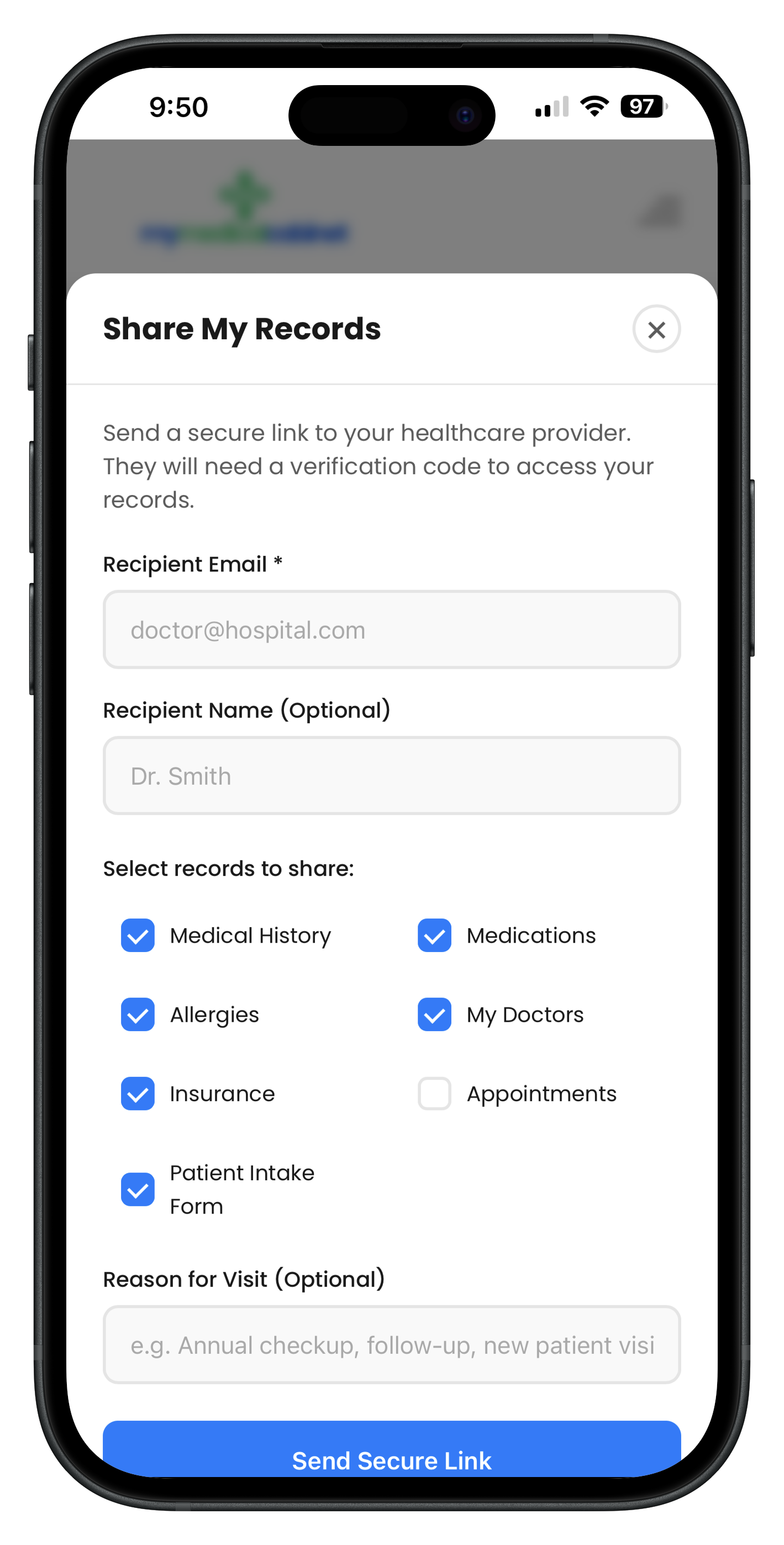
Your Records, Shared on Your Terms
Every time you visit a new doctor, you fill out the same paperwork. Your medications, allergies, conditions, surgical history — written from memory on a clipboard in the waiting room. Important details get missed. MyMedicalCabinet solves this problem.
With secure record sharing, you choose exactly which records to share — medications, conditions, allergies, doctors, insurance, or everything at once. Send a secure link via email that requires OTP verification before the recipient can view anything. Or generate a QR code at your appointment for instant, in-person access.
The Patient Intake Form feature takes it even further. Share a single link that gives your doctor's office a complete, read-only view of your medical profile — no paperwork, no forgotten details, no wasted time in the waiting room.
- Choose exactly which record types to share
- Secure email sharing with OTP verification
- QR code sharing for instant in-person access
- One-time Patient Intake Form replaces waiting room paperwork
- Time-limited access links you can revoke anytime
How Secure Record Sharing Works
Select Your Records
Choose which record types to share — medications, conditions, allergies, surgical history, immunizations, doctors, insurance, or share everything at once.
Share Securely
Enter the recipient's email to send a secure access link, or generate a QR code for your doctor to scan during your visit. All access requires OTP verification.
Stay in Control
Shared links are time-limited and can be revoked at any time. You'll see exactly who accessed your records and when in your sharing history.
Frequently Asked Questions
How do I share my medical records with a doctor?
Select which records you want to share (medications, conditions, allergies, doctors, etc.), enter the recipient's email address, and send. The doctor receives a secure link and must verify with a one-time passcode before viewing your records. You can also generate a QR code at your appointment for instant access.
Is sharing my medical records through MyMedicalCabinet secure?
Yes. All shared records are protected with OTP (one-time passcode) verification. The recipient must enter a code sent to their email before they can view any records. Shared links are time-limited and you can revoke access at any time.
Can I choose which records to share?
Absolutely. You have full control over what you share. Select specific record types like medications, conditions, allergies, surgical history, immunizations, doctors, and insurance information. You can share everything or just the records relevant to your visit.
What is the Patient Intake Form feature?
The Patient Intake Form is a shareable, read-only summary of your complete medical profile. Instead of filling out paperwork at every new doctor visit, share your intake form link and let the office view your medications, conditions, allergies, and more — all pre-filled from your MyMedicalCabinet account.